Device identification
-
Device name: Shelly 1 Gen4
-
Device model: S4SW-001X16EU
-
Device SSID: Shelly1G4-XXXXXXXXXXXX
-
Device Bluetooth ID: 0x1028
Short description
Shelly 1 Gen4 is a small form factor smart switch with potential-free contacts, which allows remote control of electric appliances through a mobile phone, tablet, PC, or home automation system. It can work standalone in a local Wi-Fi network or it can also be operated through cloud home automation services.
Shelly 1 Gen4 can be accessed, controlled and monitored remotely from any place where the User has internet connectivity, as long as the device is connected to a Wi-Fi router and the Internet.
It can be retrofitted into standard electrical wall boxes, behind power sockets and light switches or other places with limited space.
Shelly 1 Gen4 has embedded Web Interface, which can be used to monitor and control the device, as well as adjust its settings.
The device has multi-protocol wireless MCU which provides Zigbee and Bluetooth connectivity, ensuring a secure connection.
This device is compatible with Matter.
Main features
-
Wi-Fi Connectivity: The device can connect to your home Wi-Fi network, allowing you to remotely monitor humidity and temperature data through a smartphone app or other compatible devices.
-
Integration with Smart Home Platforms: You can integrate the Shelly 1 Gen4 with popular smart home platforms, including Google, Alexa, and Samsung SmartThings. This enables voice control and automation capabilities through these platforms.
-
Local and Cloud Control: Can function independently in a local Wi-Fi network and can also be operated through cloud home automation services.
-
Bluetooth Connectivity: Bluetooth and BLE gateways are available for inclusion purposes, which may be useful during the setup process.
-
Zigbee Connectivity: Zigbee is available for inclusion purposes, which may be useful during the setup process.
-
User-Friendly Interface: The device provides a user-friendly interface with a reset button for manual interactions.
-
Improved Processor: Upgraded with an improved processor and support for Zigbee connectivity.
-
Embedded Web Interface: Features an embedded web interface for monitoring, control, and adjustment of settings.
-
Wireless Connectivity: The device supports Wi-Fi (802.11 b/g/n/ax) and Bluetooth 5.0 protocols with specified indoor and outdoor range capabilities.
-
Dry Contact: Allows switching on and off of lower voltage devices.
-
BLE Gateway: Bridge between your Shelly BLU devices and the wider Shelly ecosystem. It receives Bluetooth signals and sends them to the cloud or locally to another non-Bluetooth device.
-
Wi-Fi Range extender for IoT devices: A Wi-Fi extender is employed to expand the reach of your Wi-Fi network by receiving your current Wi-Fi signal, enhancing its strength, and then transmitting the enhanced signal over a wider area.
-
Zigbee Range extender for IoT devices: A Zigbee extender is employed to expand the reach of your Zigbee network by receiving your Zigbee signal, enhancing its strength, and then transmitting the enhanced signal over a wider area.
-
Scripting: https://shelly-api-docs.shelly.cloud/gen2/ComponentsAndServices/Script
-
Wide range of integrations: The device can be integrated with 3rd party home systems, documented HTTP API, MQTT(s), Web Hooks over HTTP and HTTPS, UDP
-
Schedules: Allows scheduling of complex operations to be executed in predefined time window. Users can specify time windows based on date, time of day, weekdays, hours, minutes and seconds.
-
Virtual Components: https://shelly-api-docs.shelly.cloud/gen2/DynamicComponents/Virtual/
-
KNX net/IP support: https://shelly-api-docs.shelly.cloud/gen2/Integrations/KNX/
Use cases
-
Remote Appliance Control: Turn on or off electric appliances remotely using your mobile phone, tablet, PC, or home automation system.
-
Internet-Connected Convenience: Access аnd control devices from anywhere with internet connectivity, as long as the Shelly 1 Gen4 is connected to a Wi-Fi router.
-
Home Automation: Shelly 1 Gen4 enables automatic control of power appliances for more relaxing and enjoyable experience.
Home Automation Use Cases
Light Control
-
Remote control of standard lights (LED, incandescent, halogen).
-
Set timers or schedules for lights (e.g., porch lights on at sunset).
-
Use with motion sensors (for example Shelly BLU Motion) for occupancy-based lighting.
Garage Door Automation
-
Act as a smart trigger to open/close garage doors.
-
Monitor door status with a sensor input i.e using Shelly Plus Add-on.
-
Integrate with voice assistants for hands-free control.
Fan or Ventilation Control
Heater or Towel Rail Switching
Commercial Applications
Lighting Automation in Small Offices or Shops
Meeting Room Occupancy
Security and Access Systems
Industrial/Utility Use Cases
Equipment Monitoring & Control
Pump or Motor Control
Main applications
-
Residential
-
MDU (Multi Dwelling Units - apartments, condominiums, hotels, etc.)
-
Light commercial (small office buildings, small retail/restaurant/gas station, etc.)
-
Government/municipal
-
University/college
Integrations
Amazon Alexa supported capabilities
Google Smart Home supported traits
Samsung SmartThings supported capabilities
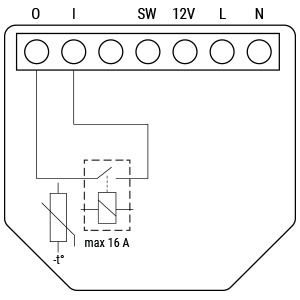
Simplified internal schematics
Device electrical interfaces
-
1 switch/button input on screw terminal
-
1 potential-free contacts relay input on screw terminal
-
2 power supply inputs on screw terminals: N and L
Outputs
Connectivity
Safety function
Supported load types
-
Resistive (incandescent bulbs, heating appliances)
-
Capacitive (capacitor banks, electronic equipment, motor starting capacitors)
-
Inductive with RC Snubber (LED light drivers, transformers, fans, refrigerators, air-conditioners, washing machines, tumble dryers)
User interface
-
One (Control) button
-
Press and hold for 5 seconds to enable Device access point and Bluetooth connection.
-
Press and hold for 10 seconds to factory reset the Device.
-
Press the button 5 times to switch the Device from Matter (default) to Zigbee profile. The Device enters inclusion mode for 3 minutes. Include the Device following the instructions of your Zigbee home automation system.
-
Press the button 3 times to restart the inclusion mode for another 3 minutes if you missed the previous 3-minute window.
Outputs
The list above starts with the initial device status and the lowest priority. Every next state cancels the previous one.
Specifications